
Okta tracks rebranded vishing: new leak site, same fake IT call.
Arrests and a rebrand did not stop voice phishing. Pair phishing-resistant MFA with independent IT caller verification before employees act on urgent reset calls.
Extortion brands come and go. The phone call telling an employee to complete an urgent password reset stays remarkably consistent.
In a November 23 threat advisory, Okta Threat Intelligence reported that O-UNC-053—a voice-phishing cluster previously linked to organizations listed on the ShinyHunters data leak site—rebounded in November with targeted organizations appearing on a new data leak site branded as INCEPTION.
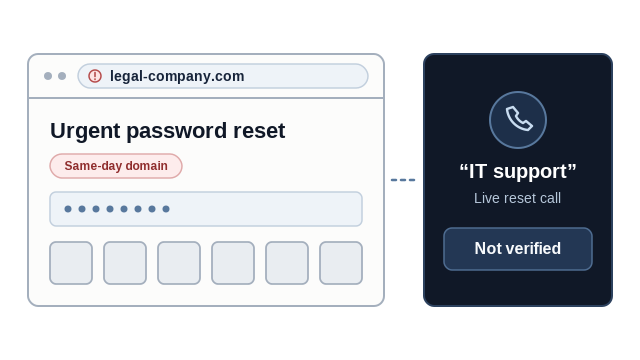
What Okta Threat Intelligence observed
Okta reports that O-UNC-053 has been active since March 2026 across technology, healthcare, biotechnology, financial services, insurance, entertainment, gaming, retail, transportation, hospitality, and legal sectors. Following late-September arrests of actors allegedly affiliated with ShinyHunters and the takedown of the ShinyHunters leak site, O-UNC-053 domain registrations dropped in September and October before rebounding in November.
On November 16, 2026, researchers observed targets with prior O-UNC-053 infrastructure appearing on the newly branded INCEPTION leak site, 6 to 19 days after domain registration. Okta notes that it cannot validate whether published leak-site data is authentic and cannot make a high-confidence assessment on whether O-UNC-053 operates INCEPTION directly or partners with another extortion actor.
Either way, the intrusion playbook stayed the same:
- Fake support calls with urgent reset pretexts: Callers impersonate IT or support personnel and pressure targeted employees to perform an urgent password reset.
- Same-day lookalike domains: In its late-October and November campaign, O-UNC-053 rotated to "legal"-themed lookalike domains such as
legal-<target>.comand<target>-legal.com, fronted by Cloudflare challenges that impede scanners. Domains were often registered within a day of a campaign starting—sometimes the same day a vishing call was placed. - Real-time credential and MFA interception: While keeping the employee on the phone, the phishing kit captures usernames and passwords and prompts for one-time passcodes or push approvals to hijack SSO sessions and exfiltrate SaaS data.
Start with phishing-resistant MFA and device controls
Okta’s primary recommendation is direct: the O-UNC-053 phishing kit cannot bypass phishing-resistant authentication such as Okta FastPass, FIDO2/WebAuthn passkeys, or smart cards.
Enforcing phishing-resistant methods in authentication policy—alongside managed-device requirements, device assurance, and Network Zones—removes the attacker's ability to relay an OTP or coach a user through a push approval on a lookalike domain.
As we noted in our earlier Okta MFA-downgrade analysis, enrollment alone is not enough if authentication or recovery policies still let a caller steer an employee into a weaker fallback.
Break the fake support call before anyone visits a domain
Technical sign-in controls protect the authentication plane. They do not tell an employee sitting on a live phone call whether the person asking for an urgent reset is actually IT.
Because O-UNC-053 registers target-branded domains hours before calling, employees cannot rely on domain blocklists or a familiar-sounding support pitch. They need an independent, company-controlled way to check the caller before taking any action.
With Fctr Verify:
- A genuine IT representative meets your organization’s verification policy and initiates a caller-verification request in Fctr Portal.
- The employee independently opens Fctr Verify in Microsoft Teams or Outlook—never using a link or domain supplied by the caller—to review the caller’s name and stated reason.
- The caller speaks a one-time phrase. The employee selects the matching phrase without reading the options aloud and waits for Verification complete.
If there is no matching request, the details look wrong, or verification does not complete, the employee hangs up and contacts IT through an established company channel. The employee never reaches the lookalike reset page.
Keep help desk recovery protected when attackers pivot
When phishing-resistant sign-in blocks direct credential relay, social-engineering operators frequently pivot to calling the IT help desk directly to request password resets, account unlocks, or authenticator recovery.
Make sure both sides of the phone call use verifiable, policy-bound controls:
- Employee calling the help desk: Use Fctr Portal to verify callers with supported enrolled methods before password resets, unlocks, or session revocations, with role checks and sensitive-account exclusions enforced separately from identity verification. See our help desk caller verification guide.
- IT calling an employee: Standardize on independent caller verification in Teams or Outlook before any caller-directed sign-in change, password reset, or remote-support session. See our remote-access caller verification brief.
Verification establishes who is participating in the interaction; identity-provider policies, managed-device checks, and operator roles still govern access and account changes.
Request a live demo to see how Fctr works alongside Okta or Microsoft Entra ID to verify callers in both directions.
Sources
- Okta Threat Intelligence: Former ShinyHunters-affiliated cluster O-UNC-053 moves to new INCEPTION leak site
- ReversingLabs: Threat Researcher’s Notebook: SSO Vishing Campaign Associated with Emerging ‘Inception’ Extortion Group
- Okta Threat Intelligence: How to stop attackers from self-serving their way into accounts
- Okta Threat Intelligence: When enrollment isn’t enough: How attackers trick users into MFA downgrades
- Canadian Centre for Cyber Security: AL26-028 – Ongoing Help Desk Voice Phishing Campaign Targeting Canadian Organizations
- Okta Identity Engine documentation: Configure phishing-resistant authentication
- Okta Identity Engine documentation: Configure device assurance policies